


This post explains how to download TikTok videos without watermark on Android and iPhone quickly and efficiently to share them on other networks.
How to download TikTok videos without a watermark? Nobody wants to miss the content of one of the social networks of the moment, and that is why users usually download videos on TikTok with the app's tool to share them on other platforms such as YouTube and Instagram. However, when doing it this way, the material comes out with the application logo and an extra at the end.
Many apps and pages offer alternatives for saving videos without TikTok Logo, but not all of them are secure. Therefore, here we will tell you how to do it with sssTikTok, a tool available on iPhone and Android that you can use in very simple steps to share your content in the most optimal way possible.
Steps to download TikTok videos without watermark on Android and iPhone
To download videos without a watermark of the TikTok logo, the first thing you should do is enter the TikTok application from your cell phone, tablet or computer and copy the link of the video you want to share. If you do not know how to do it, we will indicate it below.
Get the link to a TikTok video.
At the bottom right of the video, an arrow will appear turned to the right, the share button. Press it. If you've used it before, it may appear as the icon for the latest app, like Instagram or WhatsApp.
Look for the option to copy the TikTok link.
After pressing share, several options will appear. In the share section, look for the copy link button. Press it, and the link will be automatically saved to the clipboard.
Go to sssTikTok
Once the link is saved, go to the sssTikTok website (https://ssstik.io/es).
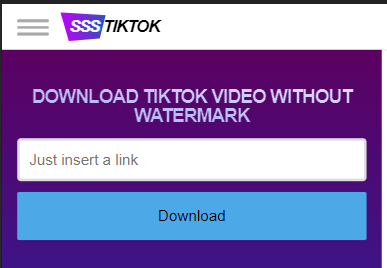
Paste the TikTok video link
Download the video without a watermark
After clicking download, three options will appear. Press the first one ( without watermark ), and you're done. Now you know how to download Tiktok videos without a watermark on your device storage. If this fails, try the option without a watermark.


5 Comments
A very delightful article that you have shared here.Free Watermark Online Your blog is a valuable and engaging article for us, and also I will share it with my companions who need this info. Thankful to you for sharing an article like this.
ReplyDeleteThank you so much for this best knowledge. I really like your work and research about tiktok video downloader online tool . You give us the best knowledge by your blog and I agree with your point of view, keep it up.
ReplyDeleteI generally want quality content and this thing I found in your article. It is beneficial and significant for us. Keep sharing these kinds of articles, Thank you.Mobile Technology
ReplyDeleteThanks for sharing for the great information about tiktok,TikTok Old Grannies Meme
ReplyDeleteAn International SIM card is a type of prepaid cellular phone card that allows phone users in different countries to communicate with each other without the need for a local SIM card. International SIM cards are available in a variety of denominations and can be used in a number of different countries.
ReplyDelete